CinemaQuo See licences

Your film, delivered as a DCP that plays.

The last step before the premiere, without the guesswork. Your film goes in. A DCP comes out, checked frame by frame, with a receipt to prove it. The picture is encoded on your graphics card by an engine we wrote for it, faster than the film plays.

Editing in Premiere Pro? The CinemaQuo exporter makes the DCP without leaving it.

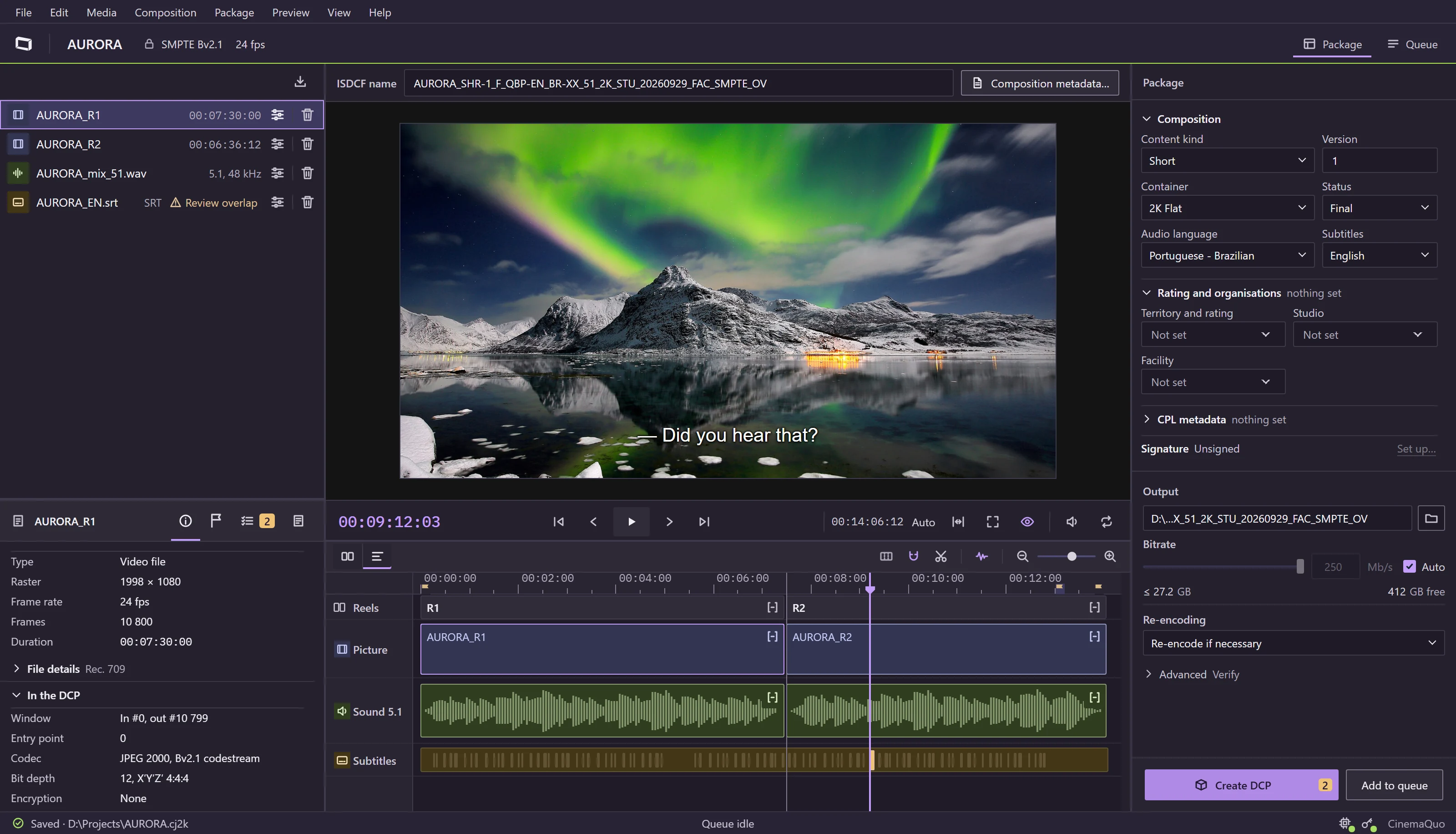
The CinemaQuo DCP Studio window with the sample project AURORA: the masters on the left, an aurora over a fjord in the viewer with a subtitle over it, the timeline with its picture, sound and subtitle lanes across two reels, and the package settings on the right.
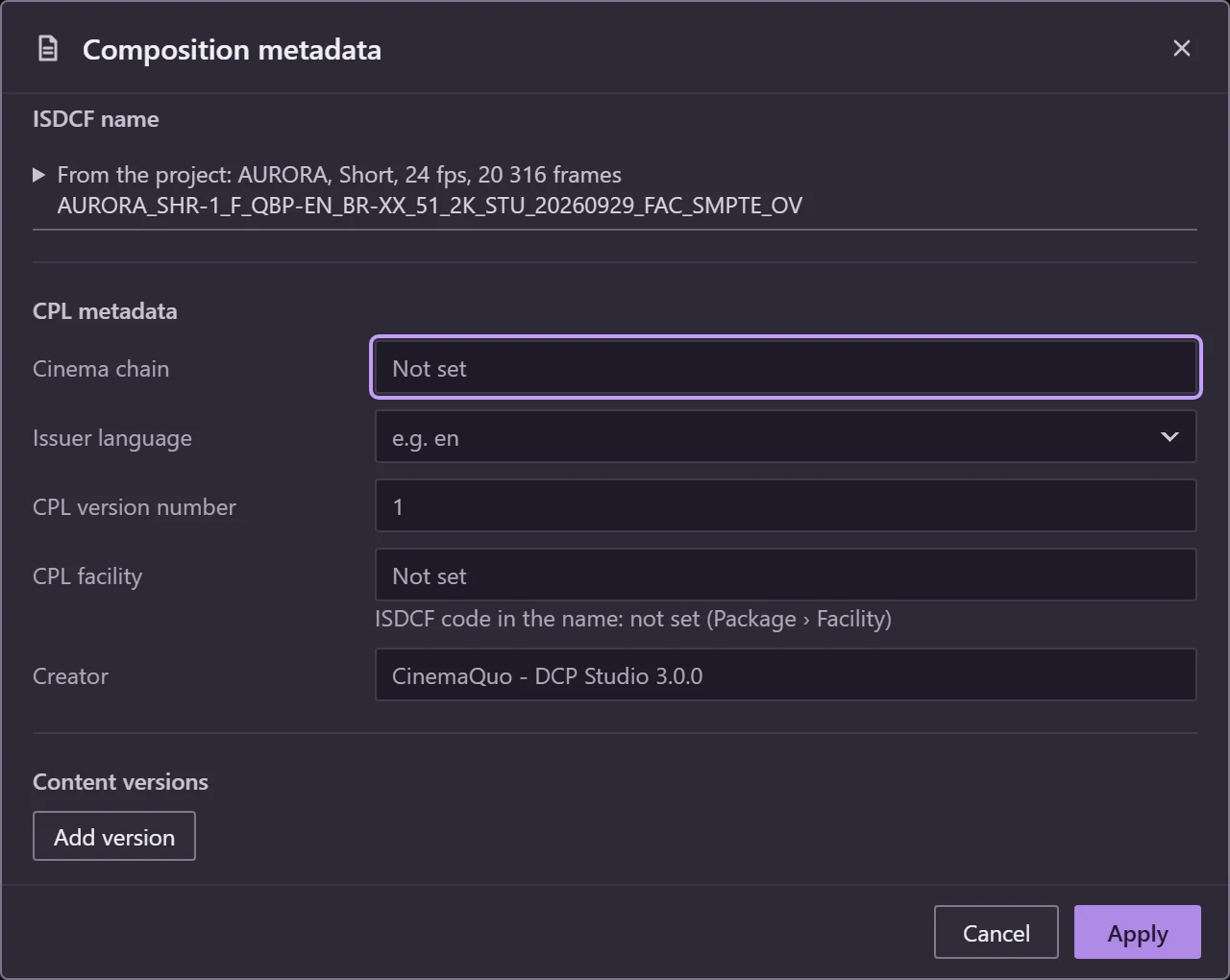
The main window with the sample project AURORA. on the left, in the middle, below and on the right. is written for you: AURORA_SHR-1_F_QBP-EN_BR-XX_51_2K_STU_20260929_FAC_SMPTE_OV. Tap the picture to see it full size.

How a package is made

One click on the Create DCP button runs five stages, and you watch each one. Anything that would stop the run is caught before it starts, with the fix written next to the problem.

  1. 1PrepareSound and subtitles are laid out for each reel, each part of the film.
  2. 2PictureEvery frame is converted to the cinema format on the graphics card. Picture already in that format is reused as it is.
  3. 3DocumentsThe package's paperwork is written and signed, so a cinema server accepts it.
  4. 4VerifyThe finished package is read again, frame by frame, as a cinema would read it.
  5. 5DecodeOptional: a second, independent reader decodes every frame once more.

Sample project AURORA: two reels, SMPTE Bv2.1.

What CinemaQuo DCP Studio does

Grouped the way the timeline groups a package: picture, sound and subtitles, then the package that carries them and the checks on it.

Picture

  • ProRes or H.264 video. Picture already in cinema format (J2C) is reused without re-encoding
  • 2K and 4K, in Flat, Scope and Full, from 24 to 60 frames per second
  • Our own JPEG 2000 encoder, written from the start to run on the graphics card
  • 2K picture encoded more than 4 times faster than it plays, 4K more than twice (measured on a GeForce RTX 4070 SUPER)
  • Without an NVIDIA RTX card it still works, much more slowly
  • Every frame identical to the industry's reference encoder
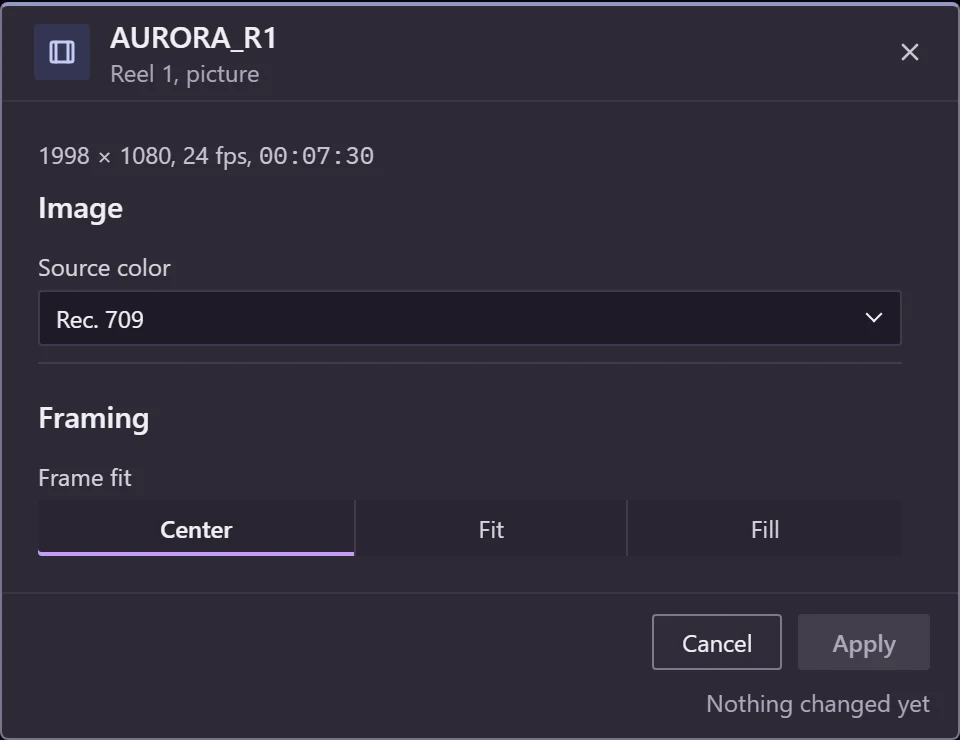
Picture settings of AURORA_R1 in CinemaQuo DCP Studio: 1998 × 1080 at 24 fps, source colour Rec. 709, and the frame fit set to Center, Fit or Fill.

Sound

  • WAV files, or the sound inside your video file
  • Stereo, 5.1 and 7.1, plus the hearing-impaired and visually-impaired channels
  • A reel without a sound file gets silence of the right length
  • The spoken language is recorded in the package
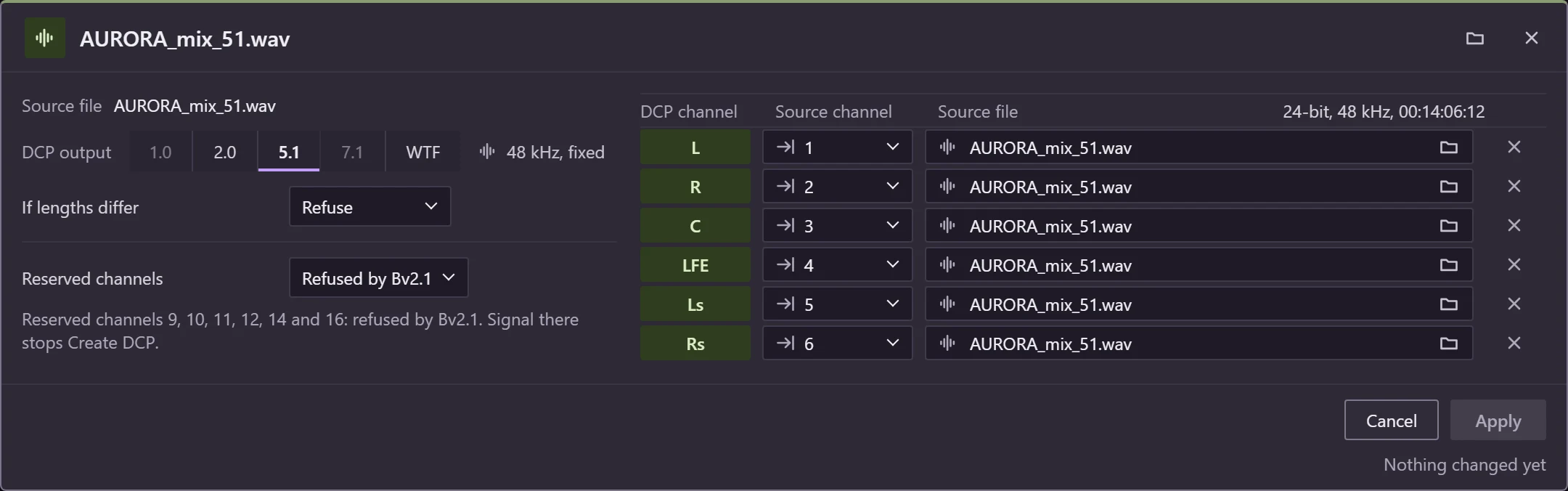
Channel mapping of AURORA_mix_51.wav: a 5.1 output at 48 kHz, each DCP channel from L to Rs taken from a channel of the file, and the reserved channels refused by Bv2.1.

Subtitles

  • SRT files, with size, position and effect settings, or cinema subtitle files (XML or MXF)
  • Warns when the chosen font is missing a character the subtitles use
  • Overlapping subtitles are flagged for review before the run
  • Shown over the picture in the viewer, inside the subtitle guides
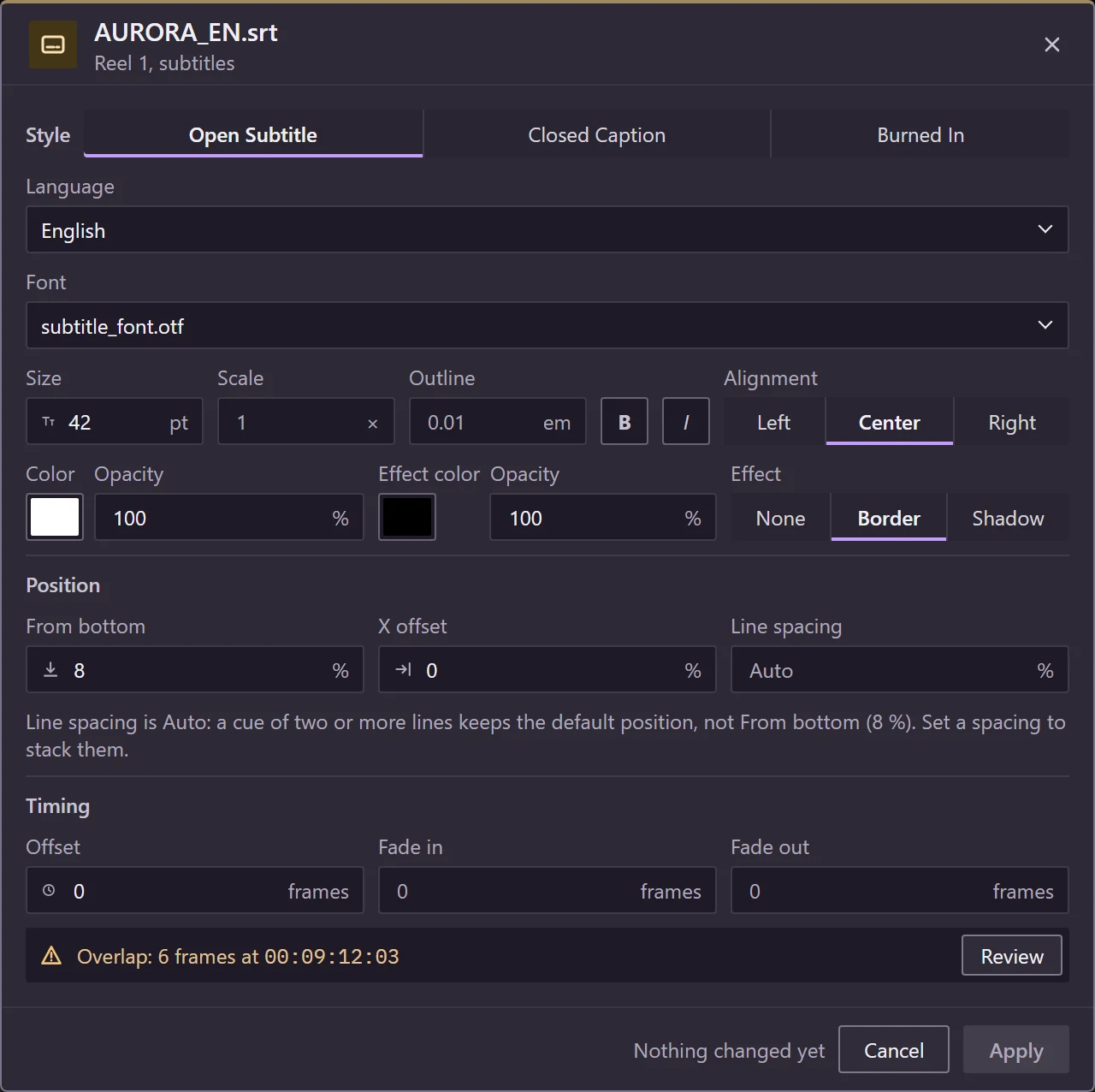
Subtitle style of AURORA_EN.srt: an English open subtitle with its font, size, colour, border, position and timing, and a warning that two events overlap by 6 frames at 00:09:12:03.

Package

  • SMPTE, SMPTE Bv2.1 or Interop, chosen per project
  • The official package name (ISDCF) and signed documents, so the server trusts the package
  • Encryption, with the keys (KDMs) you issue for each cinema
  • Version files, and a queue that runs packages overnight
Composition metadata: the ISDCF name built from the project, and the fields of the CPL, with CinemaQuo DCP Studio as the creator.

Checks

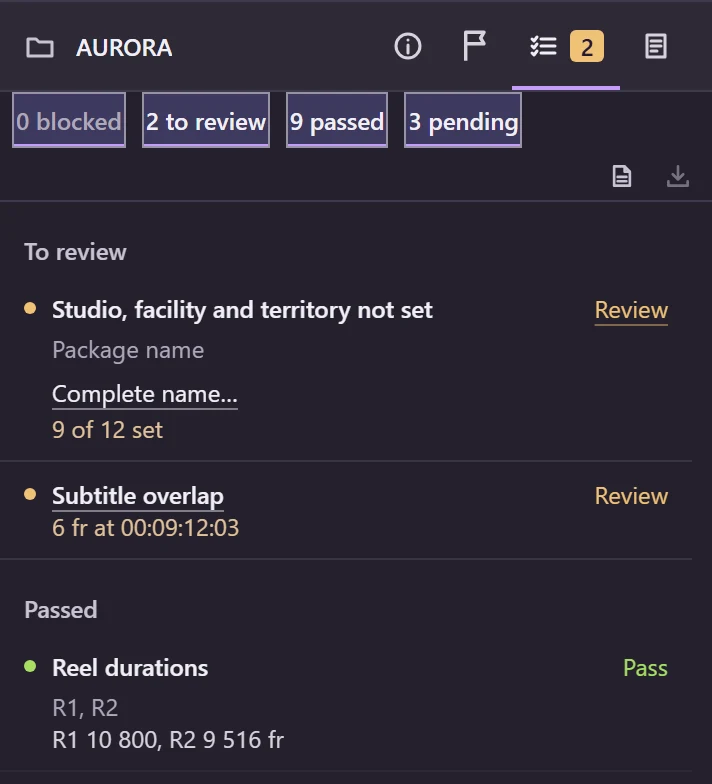
  • Before the run: every problem sorted into blocked, to review and passed
  • After the run: the package is read again, frame by frame
  • A receipt of what was written and which checks ran
  • The graphics card checks itself before its first job
The Checks tab of the AURORA project: 0 blocked, 2 to review, 9 passed and 3 pending, each item to review with its fix.

Exact formats, standards and limits are listed in detail, after the licences.

CinemaQuo exporter for Adobe Premiere Pro

A plugin that adds a DCP export to Premiere Pro. Your sequence becomes a package with its sound, using the same engine as CinemaQuo DCP Studio, without leaving Premiere.

  1. In Premiere Pro

    Edit as usual and export the sequence. Premiere renders the picture.

  2. The exporter

    Encodes the picture on your NVIDIA card and maps the sequence's sound to the channel layout you choose. A helper fills in the title and spoken language of the package name.

  3. A DCP

    The package with its sound, made by the same engine as CinemaQuo DCP Studio.

The exporter has its own lifetime licence, separate from CinemaQuo DCP Studio. See the licences.

Licences

Have finished masters to package? Choose CinemaQuo DCP Studio. Editing in Premiere Pro? Choose the exporter. Both need Windows 64-bit and an NVIDIA GeForce RTX 30, 40 or 50 series card (see the system requirements).

The store shows the current price and any tax before you pay. After payment it emails your licence key, which you enter once to activate.

CinemaQuo DCP Studio

The complete application: build, encrypt and check your packages.

  • Picture
  • Sound
  • Subtitles
  • Package
  • Checks
  • Keys

Subscription

Monthly or yearly. If you cancel, it keeps working until the end of the month or year you paid.

Lifetime licence

One payment. It does not expire.

Open the store for CinemaQuo

CinemaQuo exporter for Premiere Pro

DCP export inside Premiere Pro, tested with Premiere Pro 2026. Each product has its own licence; one does not include the other.

  • Picture
  • Sound
  • Package

Lifetime licence

One payment. It does not expire.

Open the store for the plugin
For every licence:
  • One computer at a time. To move it, deactivate it on the old computer and activate it on the new one.
  • Internet is needed to activate and each time an export starts. An export that has started finishes even if the connection drops.
  • Full refund within 14 days of purchase. See the refund policy.
  • Payments are handled by Lemon Squeezy, our merchant of record. Read the terms of use and the privacy policy.

In detail

The exact formats, standards and limits, for whoever checks the specification before buying. Everything listed here is in the application today.

Picture
InputProRes and H.264 video. JPEG 2000 codestreams (J2C) that are already encoded are rewrapped, not re-encoded.
EncoderJPEG 2000 on NVIDIA GeForce RTX 30, 40 and 50 series cards (CUDA). A CPU route when no supported card is present, much slower.
ColourRec. 709 converted to X′Y′Z′. 12-bit 4:4:4 codestreams.
Containers2K and 4K: Flat, Scope and Full.
Edit rates24, 25, 30, 48, 50 and 60 fps, fixed when the project is created.
BitrateUp to 250 Mb/s. The size the package will reach is shown before the run.
ConformanceSMPTE Bv2.1 codestreams (RDD 52). The encoder is tested bit for bit against the OpenJPEG reference implementation.
Sound
InputWAV PCM, single or multichannel, or the PCM inside the video file.
Layouts2.0, 5.1 and 7.1, with the optional HI and VI-N channels.
Reserved channelsRefused unless you allow them for the project.
Missing soundA reel without a sound master gets silence of the right length.
LanguageThe spoken language is written to the package and into the ISDCF name.
Subtitles
InputSRT, with size, position and effect settings. Timed Text in XML or MXF.
FontsA check that the chosen font covers every character in the subtitles.
TimingOverlaps flagged for review before the run.
PreviewDrawn over the picture in the viewer, inside the subtitle guides.
Package
StandardsSMPTE, SMPTE Bv2.1 (RDD 52) and Interop, chosen per project.
StructureReels, composition markers and ST 429-16 composition metadata.
NamingThe ISDCF name assembled from the package settings.
SigningSigned CPL and PKL.
VersionsVersion files (VF) that reference an original version package (OV).
QueueSeveral packages run one after another.
Checks and receipt
Before the runEvery check sorted into blocked, to review and passed, with the fix beside the reason.
After the runVerification of the written package: documents always; picture and sound by default, and it can be turned off.
DecodeOptional: every written frame decoded again with OpenJPEG.
ReceiptWhat was written and which checks ran.
Card self-checkTwo reference frames encoded and compared with the validated result before the card’s first encode.
Keys and viewer
EncryptionEncrypted packages, with the DKDM kept by your installation.
KDMsIssued for a cinema’s certificate and date range.
ViewerTransport controls and guides for Flat, Scope, the subtitle area and action-safe.
OpensMasters and the written package, in the same window.

System requirements are on their own page: Windows 64-bit and an NVIDIA GeForce RTX 30, 40 or 50 series card.

Contact

Questions about a licence, an order, a refund or a package that will not play? Write to us, and include your order number when it is about a purchase.

Write to support