Encryption and signing
Prepare the signing identity and protect a package with encryption.
Prepare the identity first
- Open File → Options… → License and certificates.
- Use Generate signing chain if no chain exists. A signing chain identifies the signer of the package documents.
- Use Export public certificate… when a public recipient certificate is needed. Before you ask for a KDM for this installation, check that Decrypts KDMs shows yes. With no, this installation's certificate cannot receive KDMs.
- Make a protected backup with Export identity…. Set and repeat the backup password, then store the file and password safely.
Encrypt the package
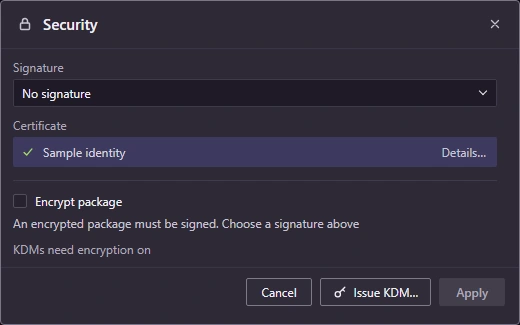
- Open Package → Security… or the package’s Signature setup.
- Choose signing under Signature and check the selected certificate. Encryption requires signing.
- Enable Encrypt package. For a new set of content keys, leave Content keys on New.
- If using the lock beside a media row instead, review its scope before applying. Enabling encryption writes the whole package encrypted, including picture, sound and subtitles.
- Apply, run Checks and create the package. The Studio writes a DKDM for this installation beside the package. Keep it: you need it to issue KDMs for this package later.
Keep access to encrypted work
A KDM (Key Delivery Message) provides the keys for a specified playback system and time window. A DKDM provides keys to a distribution or mastering recipient so it can issue other KDMs. Keep your DKDM and protected identity backup with your production records.
Send public certificates when requested. Do not send the private identity backup or its password to a cinema. See KDMs for recipient and validity choices.