Metadata and the CPL name
Build a clear cinema name and fill in composition details.
Build the cinema name
- In Package, review Content kind, Version, Container, Status, Audio language and Subtitles.
- Expand Rating and organisations to review Territory and rating, Studio and Facility.
- Read ISDCF name above the viewer. ISDCF naming combines the version’s main details in a name the cinema can recognise. Click a segment to reach its field.
- Confirm that languages and sound layout describe the real programme. Filling the name does not add sound or subtitles.
Fill in composition details
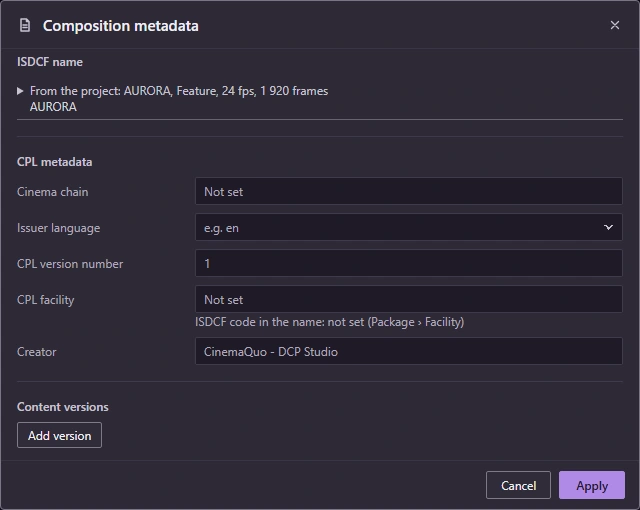
Open Composition metadata… to edit Cinema chain, Issuer language, CPL version number, CPL facility and Creator. Use Add version under Content versions when needed. Choose Apply.
CPL version number (in Composition metadata) and Version (in Package, part of the cinema name) are different fields. In the same way, CPL facility is free text, while Facility in the name is a short code. Read-only fields come from the composition or are assigned when creating the package.
If you type a name yourself
Compare a manually typed name with the actual composition. The Studio warns when it departs from the generated naming convention. Empty names and names Windows cannot use as folders still prevent creation. Resolve incomplete-name prompts before delivery.