Create, open and save projects
Choose the project standard and frame rate, save your work and reuse settings.
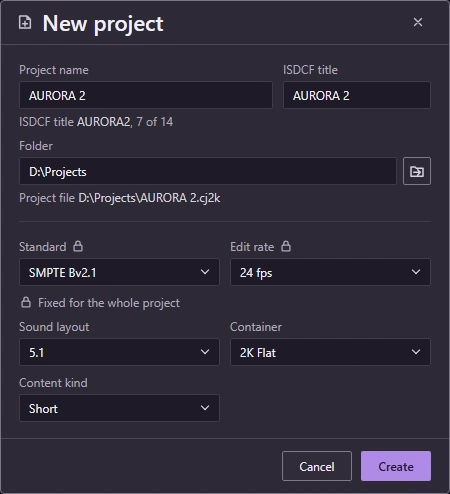
Create a project
- Choose File → New project….
- Fill Project name and Folder. Check ISDCF title separately: this shorter title helps build the cinema name.
- Choose Standard and Edit rate. The standard identifies the package format; the edit rate is the number of frames played each second. You cannot change Standard or Edit rate later in this project. To convert tracks from an existing DCP, see Tools for existing DCPs.
- Review Sound layout, Container and Content kind. Select Create.
Choose the delivery format
Standard offers three formats. SMPTE Bv2.1 is SMPTE with the extra delivery rules of RDD 52: sound at 48 kHz only, 16 channels with some kept silent, and subtitles in MXF; it is preselected in a new project. SMPTE follows the same standards without those rules: sound at 48 or 96 kHz, 8 channels. Interop is the older format, with CineCanvas subtitles and sound at 48 kHz. Choose the format requested by the cinema or distributor; do not choose by its name alone.
If a project was created with the wrong standard or rate, create a project with the correct choices and add the sources again. Confirm the destination requirements before assembling the programme.
Save, reopen and recover
Save saves the current project. Save as… writes another project file; Open project… reopens one. Projects use the .cj2k extension. Keep their media available: saving the project does not copy every source into it.
Open autosaved project… opens a recovery copy. Review it, then save the recovered work deliberately. Save as template… saves settings, metadata and naming choices without masters or reels. Set autosave and relative paths in Options.