Create and load KDMs
Choose the recipient certificate and playback window.
Issue KDMs during creation
- In Security, enable encryption and Create KDM(s).
- Use Add certificate… or Add folder… to add recipients. Obtain the correct playback-system certificate from the cinema.
- Fill Valid from and Valid to. Times are in UTC: confirm the equivalent local show times with the recipient.
- Choose KDM folder. Leave Formulation on DCI specific, the default, unless the recipient asks for Modified Transitional 1 (used for Interop packages and older equipment) or DCI any. Under Forensic marking every box is clear by default, which leaves forensic marking on. Tick Disable picture marking, Disable audio marking or Disable enhanced audio marking, or fill above channel (1 to 16, or 99), only if the recipient asks for it.
- Create the package and keep the generated KDMs for the intended recipients.
Issue a KDM later
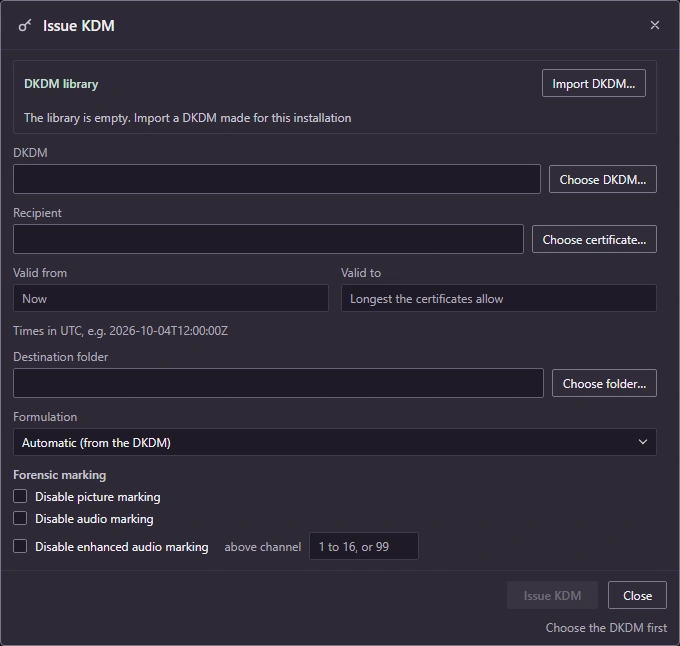
- Choose Package → Issue KDM….
- Use Choose DKDM… or a suitable entry in DKDM library. Import DKDM… adds a DKDM addressed to this installation. Here Formulation starts on Automatic (from the DKDM), which picks Modified Transitional 1 for an Interop package and DCI specific for the others; keep it unless the recipient asks otherwise.
- Use Choose certificate… for the recipient.
- Set Valid from, Valid to and Destination folder. Check the recipient and UTC window.
- Choose Issue KDM. Read any refusal: the window must fit the certificates’ validity.
Load a key for viewing
- Use File → Play DCP… to open the encrypted package.
- Choose File → Load KDM… and select a KDM for this installation and composition, or its own DKDM.
- Check the date window and the result. Loading a key resets playback position.
- For verification, use Load KDM… inside Verify a DCP.
Viewing limits
Encrypted subtitle cues are not displayed by the current viewer; loudness checking and saving a frame are also unavailable for encrypted packages. The editable-package opening path does not yet ask for a KDM. You can play and verify an encrypted package after loading its key. You cannot yet open an encrypted package as an editable project.