The main window
Find your files, reels, compositions, viewer and package controls.
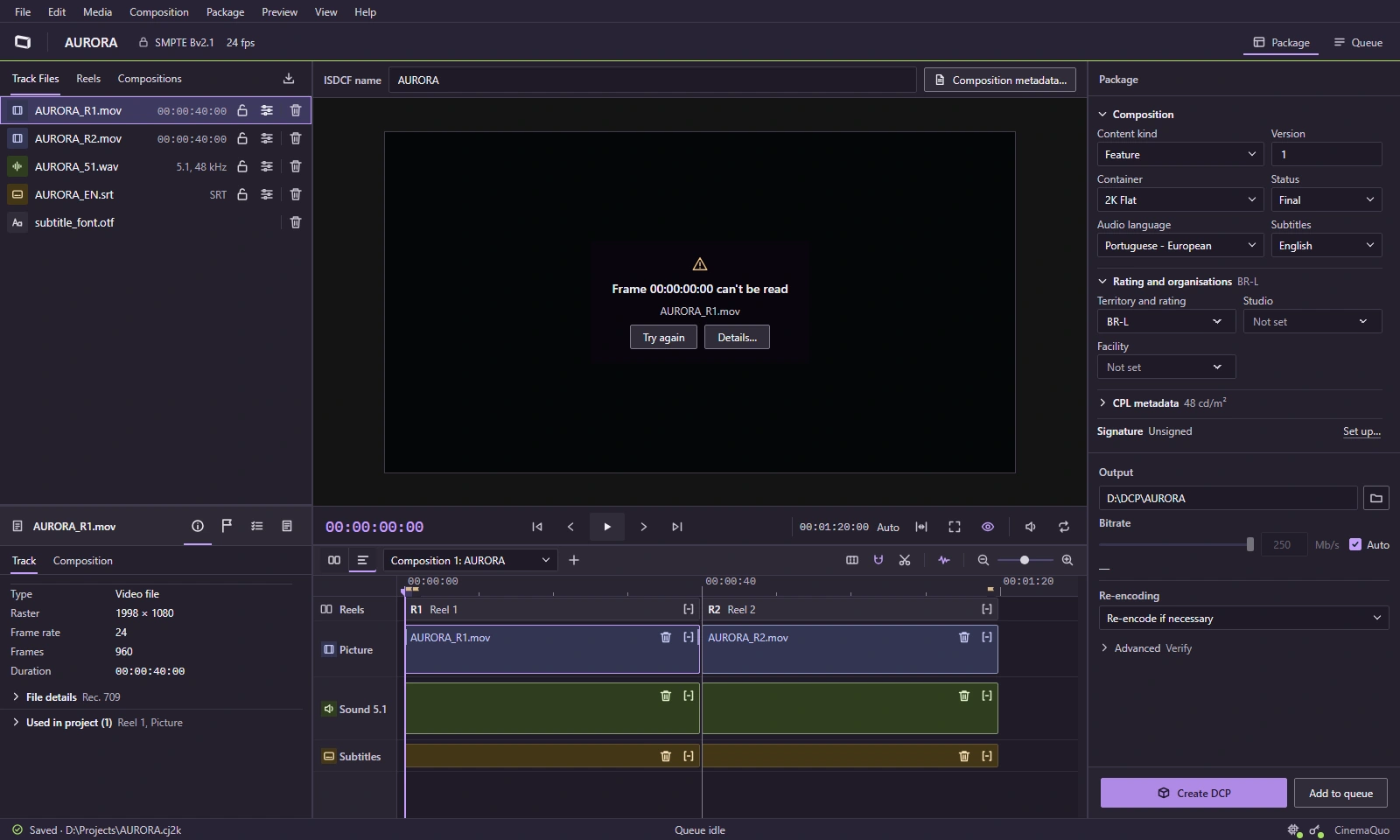
The three media views
| View | What you work with |
|---|---|
| Track Files | The source files used by the project. Select a file to inspect it; open its settings to change it. |
| Reels | The reels of the compositions. A reel is one section of the programme, with its picture, sound and subtitle tracks. |
| Compositions | The playable versions in the project. Each composition has its own CPL. |
Move around the window
- Below the media list, the inspector shows Metadata, Composition markers, Checks and Job log.
- The centre holds the viewer, playback controls and the timeline. Timeline and Reels switch the lower view.
- The right-hand Package area holds naming, destination, bitrate and Create DCP. Queue opens the jobs.
- Drag the dividers to resize areas. View → Reset layout restores their arrangement.
Use the viewer
Press Space to play or pause, and the left or right arrow to move one frame. Go to timecode accepts a timecode or a frame number. Full screen enlarges the viewer. Subtitle visibility, guides, volume and preview decode size change only the preview, not the DCP.
For a full list, see Keyboard shortcuts. For an existing package, see Play a DCP.